
 i软糖
i软糖
如果您需要将文件从一种标记格式转换为另一种标记格式,pandoc就是实现文档转换的神器。Windows/MacOS/Linux/Docker等环境。
官方主页:
支持多种格式的转换:
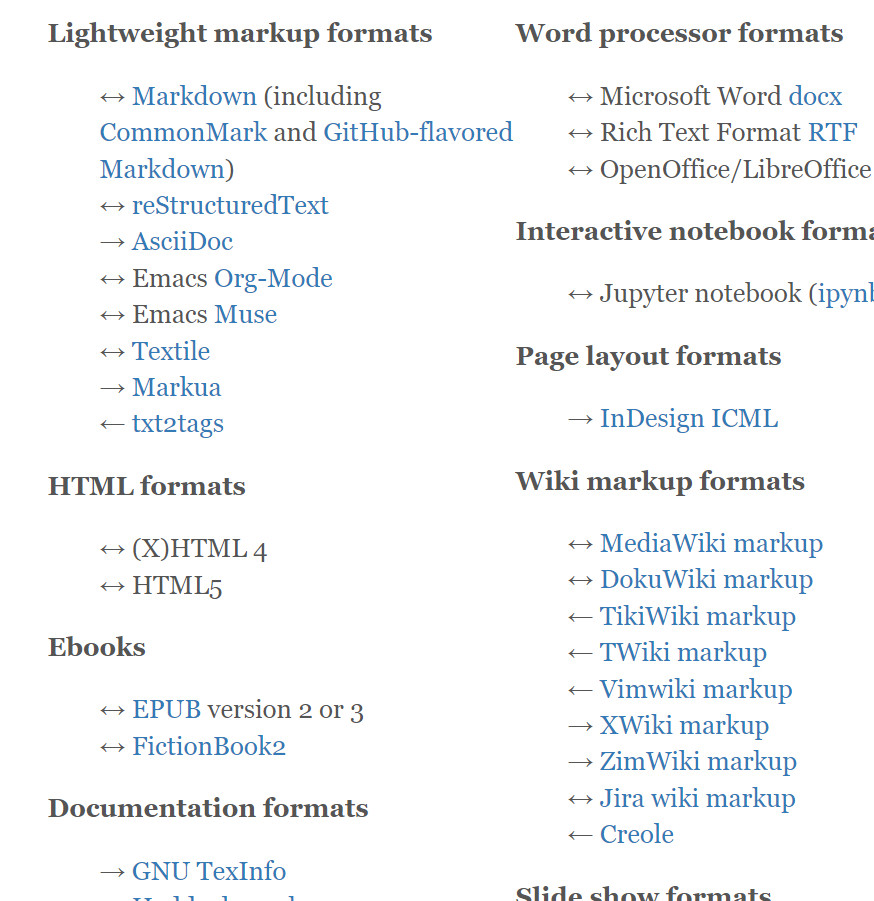
转换命令示例:
- HTML fragment:
pandoc MANUAL.txt -o example1.html - Standalone HTML file:
pandoc -s MANUAL.txt -o example2.html - HTML with table of contents, CSS, and custom footer:
pandoc -s --toc -c pandoc.css -A footer.html MANUAL.txt -o example3.html - LaTeX:
pandoc -s MANUAL.txt -o example4.tex - From LaTeX to markdown:
pandoc -s example4.tex -o example5.text - reStructuredText:
pandoc -s -t rst --toc MANUAL.txt -o example6.text - Rich text format (RTF):
pandoc -s MANUAL.txt -o example7.rtf - Beamer slide show:
pandoc -t beamer SLIDES -o example8.pdf - DocBook XML:
pandoc -s -t docbook MANUAL.txt -o example9.db - Man page:
pandoc -s -t man pandoc.1.md -o example10.1 - ConTeXt:
pandoc -s -t context MANUAL.txt -o example11.tex - Converting a web page to markdown:
pandoc -s -r html http://www.gnu.org/software/make/ -o example12.text - From markdown to PDF:
pandoc MANUAL.txt --pdf-engine=xelatex -o example13.pdf - PDF with numbered sections and a custom LaTeX header:
pandoc -N --variable "geometry=margin=1.2in" --variable mainfont="Palatino" --variable sansfont="Helvetica" --variable monofont="Menlo" --variable fontsize=12pt --variable version=2.0 MANUAL.txt --include-in-header fancyheaders.tex --pdf-engine=xelatex --toc -o example14.pdf - ipynb (Jupyter notebook):
pandoc example15.md -o example15.ipynb - HTML slide shows:
pandoc -s --mathml -i -t dzslides SLIDES -o example16a.html pandoc -s --webtex -i -t slidy SLIDES -o example16b.html pandoc -s --mathjax -i -t revealjs SLIDES -o example16d.html - TeX math in HTML:
pandoc math.text -s -o mathDefault.html pandoc math.text -s --mathml -o mathMathML.html pandoc math.text -s --webtex -o mathWebTeX.html pandoc math.text -s --mathjax -o mathMathJax.html pandoc math.text -s --katex -o mathKaTeX.html - Syntax highlighting of delimited code blocks:
pandoc code.text -s --highlight-style pygments -o example18a.html pandoc code.text -s --highlight-style kate -o example18b.html pandoc code.text -s --highlight-style monochrome -o example18c.html pandoc code.text -s --highlight-style espresso -o example18d.html pandoc code.text -s --highlight-style haddock -o example18e.html pandoc code.text -s --highlight-style tango -o example18f.html pandoc code.text -s --highlight-style zenburn -o example18g.html - GNU Texinfo, converted to info and HTML formats:
pandoc MANUAL.txt -s -o example19.texi makeinfo --no-validate --force example19.texi -o example19.info makeinfo --no-validate --force example19.texi --html -o example19 - OpenDocument XML:
pandoc MANUAL.txt -s -t opendocument -o example20.xml - ODT (OpenDocument Text, readable by OpenOffice):
pandoc MANUAL.txt -o example21.odt - MediaWiki markup:
pandoc -s -t mediawiki --toc MANUAL.txt -o example22.wiki - EPUB ebook:
pandoc MANUAL.txt -o MANUAL.epub - Markdown citations:
pandoc -s --bibliography biblio.bib --citeproc CITATIONS -o example24a.html pandoc -s --bibliography biblio.json --citeproc --csl chicago-fullnote-bibliography.csl CITATIONS -o example24b.html pandoc -s --bibliography biblio.yaml --citeproc --csl ieee.csl CITATIONS -t man -o example24c.1 - Textile writer:
pandoc -s MANUAL.txt -t textile -o example25.textile - Textile reader:
pandoc -s example25.textile -f textile -t html -o example26.html - Org-mode:
pandoc -s MANUAL.txt -o example27.org - AsciiDoc:
pandoc -s MANUAL.txt -t asciidoc -o example28.txt - Word docx:
pandoc -s MANUAL.txt -o example29.docx - LaTeX math to docx:
pandoc -s math.tex -o example30.docx - DocBook to markdown:
pandoc -f docbook -t markdown -s howto.xml -o example31.text - MediaWiki to html5:
pandoc -f mediawiki -t html5 -s haskell.wiki -o example32.html - Custom writer:
pandoc -t sample.lua example33.text -o example33.html - Docx with a reference docx:
pandoc --reference-doc twocolumns.docx -o UsersGuide.docx MANUAL.txt - Docx to markdown, including math:
pandoc -s example30.docx -t markdown -o example35.md - EPUB to plain text:
pandoc MANUAL.epub -t plain -o example36.text - Using a template to produce a table from structured data:
pandoc fishwatch.yaml -t rst --template fishtable.rst -o fish.rst # see also the partial species.rst - Converting a bibliography from BibTeX to CSL JSON:
pandoc biblio.bib -t csljson -o biblio2.json - Producing a formatted version of a bibliography:
pandoc biblio.bib --citeproc --csl ieee.csl -s -o biblio.html

最新评论
视频资源很全好用,安装后提示更新,安装包站长可以更新一下。
看這畫面應該是魔改 蜂蜜的影視TV 或 OKTV. 應該不是TVBOX, 兩個碼很不同...
网络请求失败
好用?